USA + International
 OWC Canda
 OWC Europe
Fujifilm’s instax mini Evo Cinema Camera Turns 8mm-Inspired Videos Into Instant Shareable Prints
Fujifilm's latest instax hybrid camera offers a creative way to share retro-styled videos in the moment.
Wayne Grayson • Jan 07, 2026
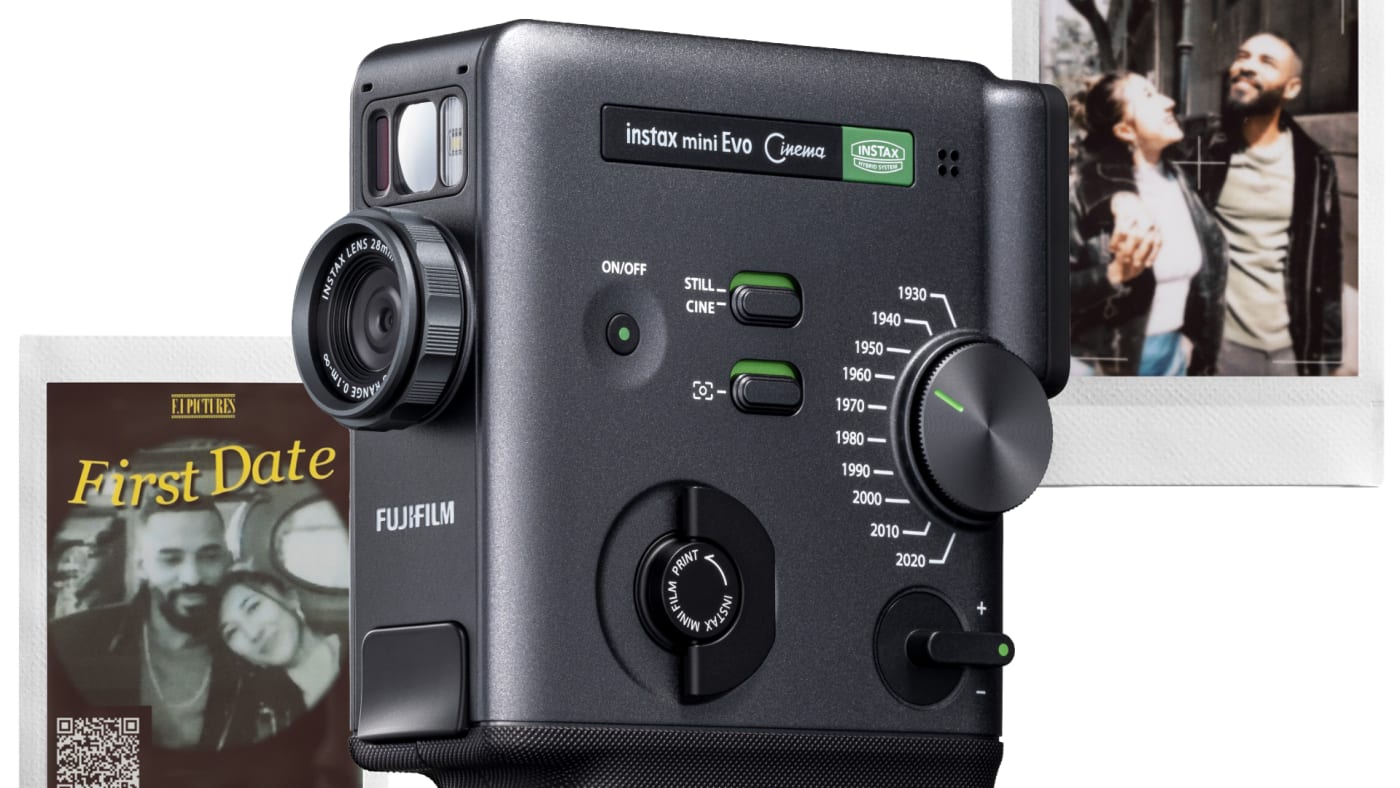
Instant cameras have always been about capturing and sharing in the moment—a tangible print you can hand to someone before the vibe fades forever. Fujifilm’s new instax mini Evo Cinema takes that same idea and adds a clever twist: it lets you capture short video clips, then hand over the moment as a physical instax print that provides access to the clip.
A hybrid instax camera built for sharing memories
The mini Evo Cinema is the latest model in Fujifilm’s Evo series of hybrid instant cameras, which combine digital capture (with an LCD for review) and on-demand instax printing. With this Cinema edition, you can shoot still images and videos, review them on the rear display, and choose what you want to print. It also doubles as a smartphone printer via the companion app.
As evidenced by the camera’s 8mm-influenced design, the headline feature is video: the camera can record up to 15 seconds per clip using simple controls—press and hold to record, release to pause, and you can shoot multiple cuts.

“Hand over a video” with a QR code print
You might be wondering how the mini Evo Cinema is able to “print” a video. Once a video is recorded, the camera turns a clip into an instax print by pairing a still frame taken from the clip with a QR code that links back to the video. The camera prints the still and code and by scanning the code with a phone, you can replay (or download) the clip for social sharing. Pretty neat idea!
There is one important workflow detail: the video has to be uploaded through the instax mini Evo app to Fujifilm’s servers for the QR code to work, and Fujifilm says the videos remain accessible for up to two years from upload with no additional fees mentioned.
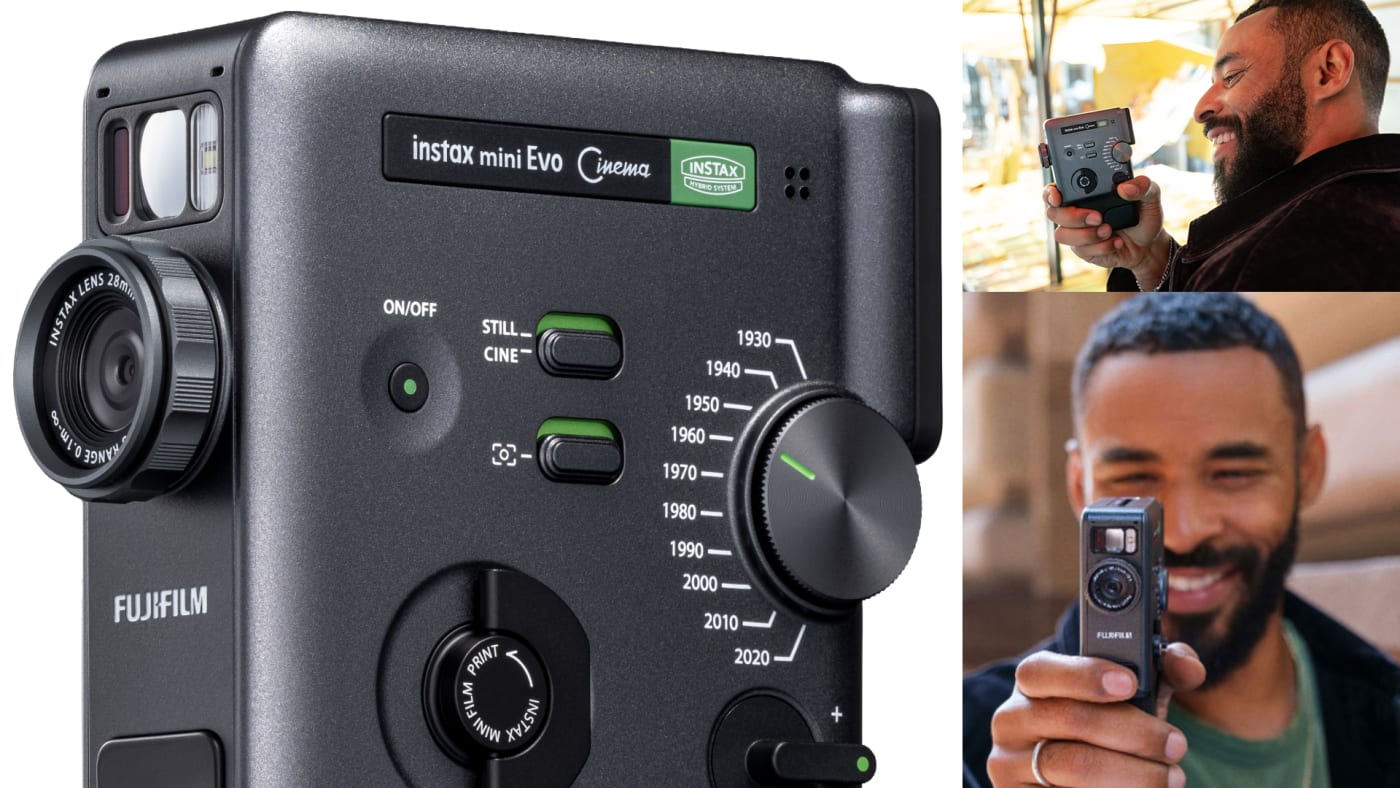
The “Eras Dial” completes the aesthetic as a time machine for look and sound
But this being Fujifilm, did you really think they wouldn’t try to emulate retro film looks? On the side of the camera is an “Eras Dial” that applies film-like video effects inspired by different decades. Fujifilm describes 10 era effects (with examples like 1960 for an 8mm-film feel and 1970 for CRT TV texture). Each effect has 10 adjustable levels, for a total of 100 possible expressions.
These aren’t just visual filters, either. Fujifilm says the effects also shape the audio character, and some even add nostalgic sounds (like film-reel whirring or shutter-style sound effects) while recording.
Retro ergonomics with a camcorder vibe
The mini Evo Cinema leans hard into “mini movie camera” energy. Fujifilm says the design is inspired by the FUJICA Single-8 (an 8mm camera introduced in 1965).
Fujifilm also calls out tactile, analog-style controls like the clicky Eras Dial and a Print Lever meant to evoke winding film by hand. Plus, Fujifilm says you can attach an included viewfinder accessory, plus a grip attachment for steadier handling.
The companion app turns clips into mini trailers
Once you’ve captured footage, Fujifilm’s dedicated app is designed to push the “cinema” concept further. Fujifilm says you can combine multiple clips into a single video of up to 30 seconds, and add cinematic opening and ending templates. There’s also a “Poster Template” feature to create movie-poster-style prints with titles and text, and a direct print feature for printing images from your smartphone.
Fujifilm also notes Bluetooth and Wi-Fi support for transferring and previewing content in the app.
A cool new storytelling tool
If you’re a working creator, the mini Evo Cinema obviously isn’t competing with your real camera. It’s more like a storytelling accessory—something you bring to set, to a shoot day, or to a creative meetup to generate physical artifacts from your process:
- Instant keepsakes for wedding photographers/videographers to share while shooting a client’s big day.
- Instant storyboards: Print a still frame that represents a setup, lighting idea, or location—then keep the video linked to it for reference later.
- A tactile social object: In a world of infinite camera rolls, a physical print with a scannable memory is a surprisingly sticky way to make clients or coworkers remember a clip.
And when you do move those clips and stills into your main workflow, don’t forget the next crucial steps: offloading and backup. Even short-form projects add up fast once you start collecting behind-the-scenes moments, reference clips, and creative diary-type media. A fast external SSD is an easy way to keep that library portable between your iPhone/iPad and your Mac—especially if you’re organizing assets for edits, social posts, or a longer project. Find the perfect external storage solution for shuttling your assets right here.
Specs, pricing, and availability
- Camera: Fujifilm instax mini Evo Cinema hybrid instant camera
- Video: Up to 15-second clips; printable still frames with QR codes that link back to video.
- Effects: 10 “Eras Dial” era-inspired effects, each with 10 levels (100 total expressions); effects influence audio too
- App features: Clip combining up to 30 seconds, opening/ending templates, poster templates, direct printing from smartphone
As far as pricing and availability go, Fujifilm will be launching the instax mini Evo Cinema in Japan on January 30, 2026. Fujifilm has not announced the camera’s price or whether the camera will be released outside of Japan, but here’s hoping they do!
Other topics you might like

Godox's C100 is a Novel Light Meter and Mini Camera With a Transparent Display
Updated on Aug 5, 2026

Peak Design's Field Bracket is a Modular, AirTagged Evolution of the L-Bracket
Updated on Jul 28, 2026
Sony’s New FX5 Brings New Sensor, Open Gate, VENICE-level Features to a Compact Cinema Camera
Updated on Jul 23, 2026